Contact Us
Table of contents
Most IT asset management evaluations spend weeks on feature comparison and about ten minutes on deployment. That order is backwards. Where the system runs decides who maintains it, how fast it goes live, whether five sites share one record, and what happens the morning your network drops. Feature lists converge across vendors. Deployment models do not.
This guide covers what cloud-based IT asset management means in practice, how a hosted platform differs from an on-premise install, and the conditions under which each one is the right call.
Key facts
- Cloud-based IT asset management runs on vendor-hosted infrastructure, and users reach it through a browser plus a companion mobile app.
- On-premise IT asset management runs on servers your organization owns, and your IT team handles patching, backups, and version upgrades.
- Cloud deployment removes server provisioning and upgrade work from your team, and it places asset data outside your network boundary.
- On-premise deployment keeps asset data inside your boundary, which air-gapped facilities and some regulated environments require.
- Hybrid models pair a hosted platform with offline-capable handheld scanning, so physical counts continue during connectivity loss.
- Four factors settle the decision: data residency policy, the number of sites sharing one record, available server administration capacity, and offline scanning requirements.
What is cloud-based IT asset management?
Cloud-based IT asset management is asset tracking software that the vendor hosts and you reach over the internet, normally through a browser and a handheld or mobile app, paid for as a subscription.
The vendor runs the application servers, the database, the backups, and the security patching. Your team gets accounts and permissions rather than hardware. Handheld RFID readers, barcode scanners, and phones write their reads into that hosted database, so a technician scanning a rack in one building and a controller pulling a depreciation report in another work from the same record set.
One distinction gets glossed over in sales conversations. NIST's definition of cloud computing (SP 800-145) lists five characteristics: on-demand self-service, broad network access, resource pooling, rapid elasticity, and measured service. A vendor who simply moves your server into their rack and gives you a login meets almost none of them. Ask which of the two you are buying, because the answer changes your upgrade path and your position at renewal.
How does cloud-based ITAM differ from on-premise deployment?
Cloud and on-premise deployments differ in four ways that matter operationally: who runs the infrastructure, how long it takes to get a live record, how multiple sites share data, and how much control you keep over where that data sits.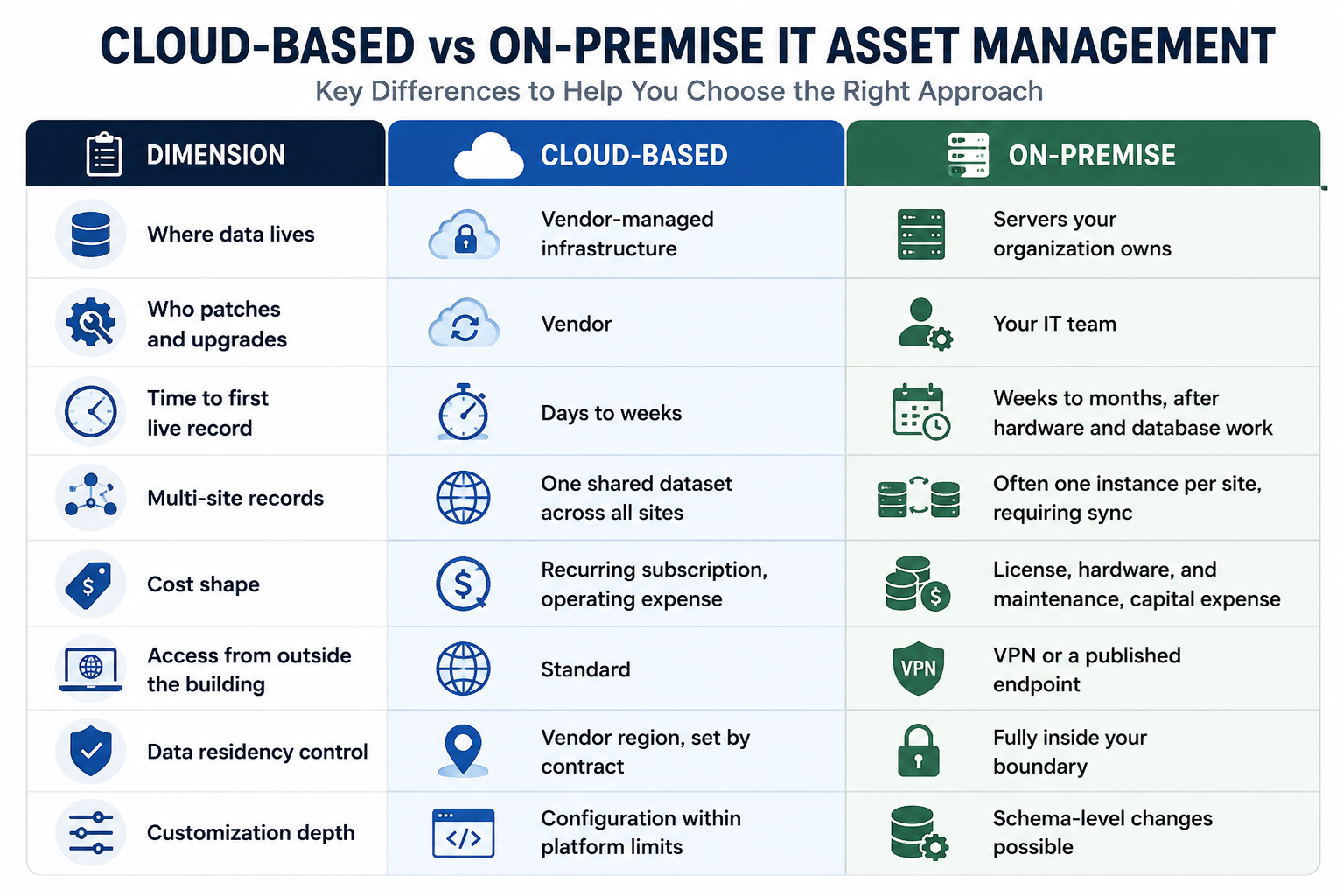
The cost comparison misleads people more than any other row. A subscription looks more expensive than a one-time license until you add the server, the operating system licensing, the storage, the backup target, the annual maintenance percentage, and the staff hours spent on version upgrades every few years. Price the five-year total on both sides before you conclude anything.
When does cloud-based IT asset management make more sense?
Cloud deployment fits organizations with multiple locations, thin server administration capacity, and stakeholders who need access from outside the building.
Four conditions point this direction:
Several sites need one record set. A district, campus, hospital network, or multi-building operation cannot answer "how many devices do we own" if each site keeps its own database. A hosted platform gives every site one shared record and gives the central team a rollup without a sync job. Cedar Falls School District tracks roughly 25,000 assets serving 6,000 students, and inventory updates that used to take days now finish in minutes. That deployment runs on barcode rather than RFID, which is a reminder that deployment model and capture technology are separate choices.
Nobody has spare server capacity. If your infrastructure team is already behind on patching, adding an application server, a database, and an upgrade cycle makes the asset program compete with work that has an SLA attached. Hosted platforms remove that competition.
Finance and audit need access without network access. Controllers, external auditors, and grant administrators rarely sit on your network. Handing them a browser login is faster than a VPN account and a security exception.
Scanning happens on mobile hardware. RFID handhelds and phones sync more predictably to a hosted endpoint than to an internal server that requires VPN. For teams doing rolling counts across buildings, this removes a class of support tickets.
When does on-premise IT asset management make more sense?
On-premise deployment fits facilities where policy or regulation prevents asset data from leaving the network, and organizations that need changes at the database schema level.
Three conditions point this direction. First, air-gapped and classified environments have no external connectivity by design, so a hosted platform is not an option regardless of its merits. Second, data residency rules in some jurisdictions and contracts bind asset records to a location the vendor cannot serve. Third, an existing security policy may classify asset and configuration data as restricted, and that position has a defensible basis: your asset inventory describes your attack surface. CIS Critical Security Controls names inventory and control of enterprise assets as Control 1, ahead of every other control in the list, precisely because that data is foundational.
The tradeoff deserves stating plainly. On-premise transfers operational work to your team permanently. Someone patches the operating system, tests each upgrade in a staging environment, monitors the backup, and owns the disaster recovery plan. That is a standing commitment of staff hours, not a one-time install. Choose on-premise when a requirement forces it, not because it feels safer by default.
Can you run a hybrid model?
Yes, and two hybrid shapes come up repeatedly in asset tracking specifically.
The first is a hosted platform with an offline-capable edge. Handheld readers cache reads locally and sync when connectivity returns, and fixed readers buffer events during an outage. This matters more for asset management than for most software categories, because a physical count is a scheduled event with people walking a floor. If a WAN hiccup stops the count, you lose the labor, not just the session.
The second is a hosted reporting layer over a local record of authority. Restricted sites keep their data on site, and only aggregated rollups leave the boundary. Organizations with one secure facility and eight ordinary ones often land here rather than forcing every site onto the strictest requirement.
What should you ask a vendor before choosing a deployment model?
Eight questions separate a real answer from a marketing answer. Send them in writing.
- Where is our data hosted, in which region, and can we name that region in the contract?
- What happens to a scanning workflow when the site loses connectivity, and does the mobile app queue reads until it returns?
- Which certifications cover the hosted environment, such as SOC 2 Type II or ISO/IEC 27001, and what is the date of the most recent report?
- Is the environment single-tenant or multi-tenant, and where is the boundary between our data and another customer's?
- Do the cloud and on-premise versions have feature parity, and how many releases behind does the on-premise build typically run?
- How do we export the full dataset, in what format, and what happens to our data at contract end?
- Is integration through a documented API, or does it require direct database access?
- Who owns upgrades, and can we defer one if it lands during our audit window?
That fifth question catches a common surprise. Vendors who offer both models often develop the hosted version first, and the on-premise build trails it. If a capability you saw in the demo only exists in the cloud release, you want that in writing before signing.
How do you decide between cloud and on-premise?
Work through five questions in order. The first one that returns a hard answer usually ends the discussion.
- Does policy or regulation prohibit asset data from leaving your network? A yes ends the evaluation. Build on-premise or a hybrid with a local record of authority.
- How many sites need to share one record? More than two, and cloud saves you a sync problem you would otherwise own forever.
- Who administers the server, and what else is on their plate? If you cannot name the person, you do not have on-premise capacity.
- Do scanning workflows need to keep running during a network outage? This is an edge question rather than a hosting question. Require offline capture in the mobile app either way.
- How much schema customization do you actually need? Teams routinely overestimate this. Ask what specifically cannot be handled by custom fields and configuration, and get the answer from the people who will use the system.
The short version: deployment model follows your constraints, not your preferences. If a regulation, a policy, or an air gap dictates the answer, that constraint wins. Absent one, multi-site organizations with limited server capacity get more from a hosted platform, and the total cost usually favors it once staff hours enter the calculation.
Asset Vue supports both hosted and on-site deployments across data centers, campuses, hospital networks, and multi-site operations. If you want a walkthrough of which model fits your environment, schedule a call with the team.


 FAQ
FAQ
Frequently Asked Questions
Our customers rely on Asset Vue to keep critical operations running smoothly. Here’s what they say about working with us.
Is cloud-based IT asset management secure enough for regulated industries?
For most regulated industries, yes. Banks, hospitals, and universities run hosted asset platforms under SOC 2 Type II and ISO/IEC 27001 controls, with encryption in transit and at rest. The exceptions are air-gapped and classified facilities, where external connectivity is prohibited outright rather than evaluated on control strength.
Does cloud-based IT asset management work without internet access?
The web application does not, but the scanning layer can. Handheld readers and mobile apps built for offline capture store reads on the device and sync when connectivity returns, so a physical count survives an outage. Confirm this capability specifically, because it varies by vendor and it is the part that affects field work.
What is the difference between cloud-based and SaaS IT asset management?
SaaS is one delivery model of cloud software, where the vendor operates a shared multi-tenant application and all customers run the same version. Cloud-based is broader and includes single-tenant hosted instances and private cloud deployments. The practical difference is version control: SaaS customers upgrade when the vendor upgrades.
Can you migrate from on-premise IT asset management to the cloud?
Yes, and the work sits in data quality rather than data transfer. Export, deduplicate, and reconcile your existing records against a physical count before importing, because migration copies your errors along with your assets. Plan a verification pass on site as part of the project rather than after it.
Is cloud-based IT asset management cheaper than on-premise?
Over five years, usually, once you count server hardware, operating system licensing, backup storage, annual maintenance fees, and the staff hours spent on upgrades. On a first-year license comparison alone, on-premise often looks cheaper. Model both against the same time horizon and the same staffing assumptions.