Contact Us
Table of contents
A data center move is the biggest single physical event most hardware will ever go through. Hundreds or thousands of assets get de-racked, packed, trucked, staged, and re-installed in a window measured in days, often by a moving crew that has never touched your asset system. Every one of those steps is a chance for the record and the hardware to part ways.
Most teams discover this after the cutover. The new site's DCIM shows 1,400 servers. The RFID sweep finds 1,372. Twenty-eight devices are somewhere between the old cage, a staging room, a truck, and a rack position nobody scanned. Someone spends the next three weeks walking aisles.
This guide explains why hardware-enabled asset management platforms produce inaccurate inventory data during migrations, and what to put in place before, during, and after the move so asset inventory accuracy comes out the other side intact.
Why migrations break asset inventory accuracy
Inventory management platforms are built for steady-state change. On a normal week, a data center might see a few dozen moves, adds, and changes. Readers sit in fixed places, workflows assume one change at a time, and syncs to the CMDB and DCIM run on a schedule that's fine for that pace.
A migration breaks every one of those assumptions at once.
Volume spikes. Instead of 30 changes a week, you have 3,000 in a weekend. A 1% capture miss that's tolerable in normal operations means 30 unaccounted assets now.
Locations stop meaning anything. Fixed readers and rack sensors report where an asset is relative to the infrastructure. When the infrastructure itself is being taken apart, an asset can read as "in Row C" while sitting on a pallet in Row C's aisle.
Custody passes to people outside the workflow. Movers, cabling contractors, and colo staff each handle hardware without logging into your asset tracking system. Their records live in their own manifests and spreadsheets.
Planning data impersonates reality. Migration teams build detailed rack elevations for the destination. Those plans often get bulk-loaded into the DCIM as if they describe what was installed, which replaces verified data with intended data.
None of this means your hardware asset management platform is faulty. The platform is doing what it was designed to do, under conditions it wasn't designed for. The fix is to adapt the workflows around it for the length of the move.
Why this matters more in 2026
Two trends raise the stakes. Consolidation into colocation and hybrid footprints means more organizations are moving hardware between sites they don't fully control. And dense GPU and AI infrastructure has pushed the value of a single chassis far above a typical general-purpose server, so one misplaced unit is a larger financial and security exposure than it used to be.
Where inaccurate inventory data comes from during a move
Errors cluster at specific points. Knowing where they happen tells you where to put controls.
Before the move: a dirty baseline
If the inventory is wrong going in, the move copies the errors to the new site and adds new ones. Ghost assets get "migrated" on paper. Duplicate records turn into two expected devices when only one arrives. Assets that were never tagged get moved without anyone noticing, then show up at the destination as unknown hardware.
Tags that don't travel with the asset
Tags placed on removable parts are a classic migration problem. A tag on a bezel, faceplate, or rail kit can separate from the chassis during de-racking. The bezel gets packed in a different crate, or reattached to a different server at the destination. Now the record follows the plastic, not the computer.
Pack-out without container links
Movers pack assets into crates, carts, or pallets. If each asset is scanned but never linked to the container it went into, you lose the ability to trace a missing device. You know it left the rack. You don't know which of 40 crates it's in.
The transit custody gap
Between the loading dock and the destination, custody usually sits with the moving vendor. Their manifest may use different identifiers, like crate numbers or their own labels, so reconciling it against your asset records becomes a manual matching exercise after the fact.
Staging-area confusion
Destination staging rooms fill up with hundreds of devices waiting for install. RFID readers pick up assets through doors and across aisles, so stray reads can place a staged server in a room or zone it hasn't entered yet. Handheld scanners that work offline in a cage with poor connectivity may hold their scans until someone remembers to sync.
Install based on the plan, not the scan
The most common destination error is recording an asset's position from the rack elevation plan rather than confirming it. Plans change on the floor: a server goes two U lower because of a cable manager, or into the next cabinet because a PDU isn't ready. If nobody scans at install, the record shows the plan.
Post-move bulk updates
After cutover, teams often push a bulk import to the CMDB and DCIM to "update everything at once." If that file comes from the plan or the mover's manifest, it overwrites the scan data your platform captured. Components pulled for data security, such as drives removed before transport, add another layer of mismatch between what the record describes and what's in the chassis.
Step 1: Clean the baseline before anything moves
Start 60 to 90 days out. The goal is a baseline where every record matches a physical device, because every error you carry into the move will be harder to find afterward.
Run a full RFID sweep of the source site and verify exceptions with barcode scans. Reconcile the results against the CMDB, DCIM, and the finance fixed-asset register, and resolve every mismatch before you finalize the move plan. This is also the moment to find decommission candidates. The Uptime Institute has estimated that roughly 20% of servers in an average facility are obsolete or unused, a figure cited in AssetVue's comparison of real-time asset management tools for data centers. Retiring those devices before the move cuts freight, rack space, and reconciliation work at the destination.
Close the pre-move baseline with a signed-off count by row and cabinet. That count becomes the number every later checkpoint reconciles against.
Step 2: Fix tag placement and assign move IDs
Audit tag placement across the source site. Every tracked asset should carry its RFID tag and barcode on the chassis itself, not on a bezel, rail, or removable panel. Replace damaged, unreadable, or duplicate tags now.
RFID performance in a data center depends heavily on tag type and mounting position, because steel racks and dense metal chassis interfere with reads. Tag and reader strategy for metal-heavy environments is one of the first criteria to check when you evaluate a platform, and it matters even more during a move, when assets pass through carts, crates, and staging areas that were never mapped for reads.
Then assign each asset a move record tied to its existing asset ID, not a new identifier. The move record should hold source location, destination location from the plan, move group or wave, and the container it will ship in. Using the permanent asset tag as the key avoids the duplicate-record problem that appears when movers or migration tools generate their own IDs.
Step 3: Scan at every custody transfer
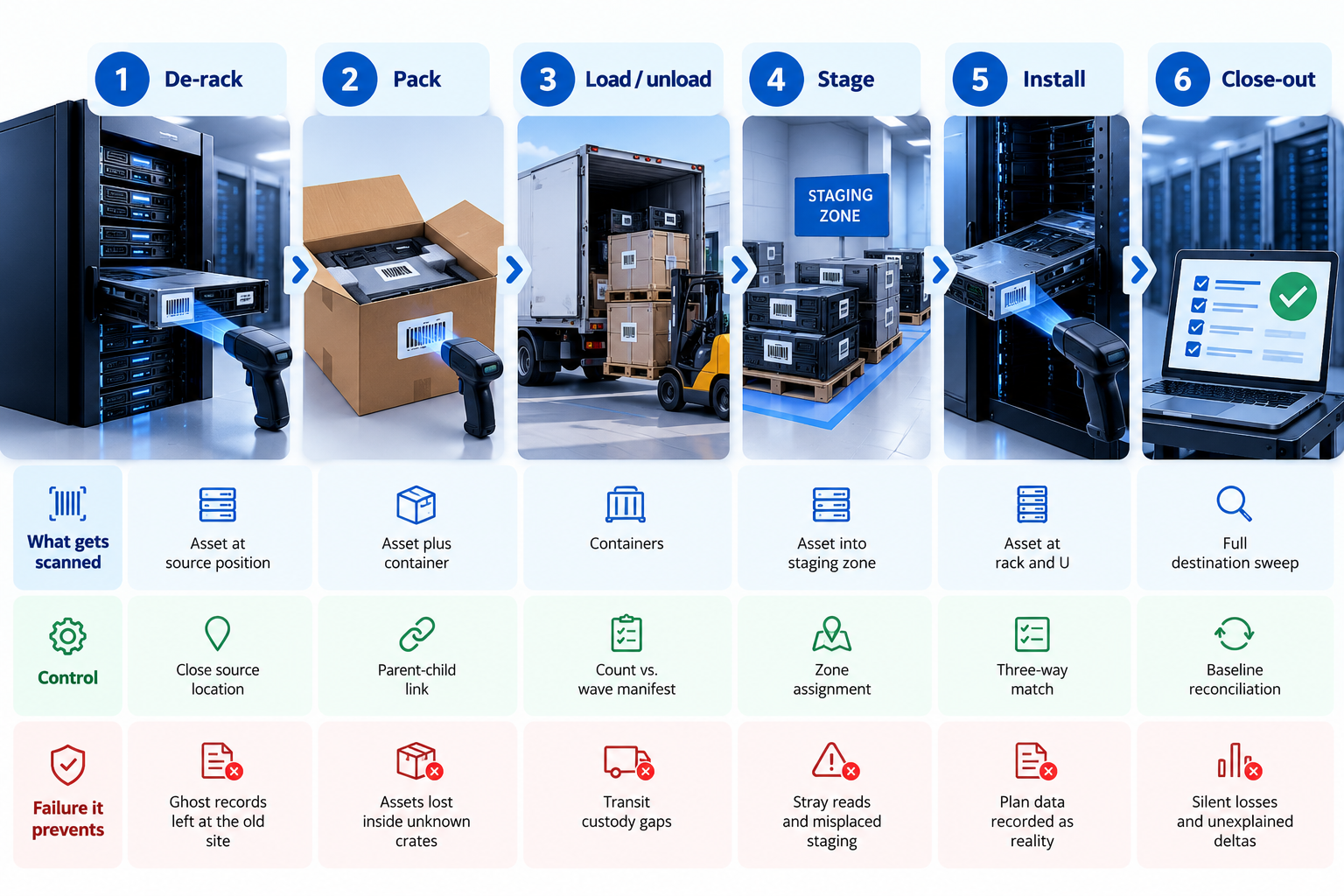
The rule for move day is simple: every time an asset changes hands or changes place, it gets scanned. Most migrations need six checkpoints:
- De-rack: scan the asset as it leaves its source position, which closes the source location.
- Pack: scan the asset and the container together, creating a parent-child link.
- Load: scan containers onto the truck, with a count against the wave manifest.
- Unload: scan containers off the truck at the destination and compare counts.
- Stage: scan assets into a named staging zone as they come out of containers.
- Install: scan the asset at its destination rack and U-position, which opens the destination location.
Use RFID for bulk steps, like counting a pallet of 40 servers at the dock, and barcode for precise steps, like confirming a specific device at a specific U-position. Handheld devices should sync at the end of every wave, with a supervisor checking that the sync completed before the next wave starts.
Give the moving crew scanning responsibility at pack, load, and unload, and make those scans a contractual deliverable. If their process can't produce scans, assign your own staff to those checkpoints.
Step 4: Put reconciliation controls at every checkpoint
Scans alone don't protect asset inventory accuracy. Controls decide what happens when the scans disagree.
Count at each checkpoint. Every checkpoint has an expected count from the previous one. Compare them before the wave moves forward. A pallet that should hold 40 servers and reads 39 gets resolved at the dock, not three weeks later.
Three-way match at install. Before an asset is marked "installed," the move manifest, the install scan, and the destination plan should agree on asset ID, rack, and U-position. Where the scan and the plan differ, the scan wins and the plan gets corrected.
An exception queue with owners. Every mismatch goes into a queue with a named owner and a deadline, ideally resolved within the same shift. Unresolved exceptions should block the wave from closing.
Freeze bulk imports. Pause scheduled bulk syncs to the CMDB and DCIM during the move window. Push destination data only after install scans are reconciled, and only from scan-verified records.
Define field ownership. Decide in advance which system owns location (the tracking platform), which owns configuration (the CMDB), and which owns power and space (the DCIM). Syncs should only write a field from its owning system.
A close-out gate. Don't declare the migration complete until the destination count matches the pre-move baseline minus planned retirements, with every difference explained.
Step 5: Confirm location at the destination
The destination is where location tracking earns its cost. Install scans capture where each asset went, but you also need a way to catch the changes that follow in the first few weeks: servers swapped during burn-in, units shifted to balance power, spares moved from staging into the cage.
Rack-level tracking handles this without extra labor. AssetVue's approach to data center asset tracking uses Real-Time Racks and Smart Cabinets to report installed equipment and open U-space continuously, combined with passive RFID and barcode scanning, and it integrates with DCIM, CMDB, and ticketing tools so the destination records stay current as hardware settles. AssetVue reports that RFID reduces manual inventory time from about an hour per rack to under a minute, which makes a full destination sweep practical on the first day after cutover instead of a project for next quarter.
For staging zones, use fixed or handheld readers with defined read zones, and clear the staging area in the system when it's physically cleared.
Step 6: Run a post-move verification window
Hold a 30-day verification window after cutover. Run a full sweep in the first week and a second at day 30, and compare both against the close-out count. Post-move cleanup, re-cabling, and hardware swaps generate their own changes, and this is when drift starts again.
This is also the right time to decide how you'll keep the new site accurate. Teams that return to annual manual audits usually rebuild the same drift they spent the migration cleaning up. Real-time asset management tools keep location and custody current as changes happen, which turns the next audit into a confirmation rather than a rebuild.
Track three numbers through the window:
- Record-to-rack match rate: share of sampled records where asset, rack, and U-position all match.
- Open exceptions: count and age of unresolved mismatches.
- Unverified assets: devices with no scan since install.
Building the budget case
Migrations come with a fixed budget, and asset tracking often gets treated as optional. The cost of skipping it shows up later: staff hours spent searching, replacement purchases for hardware that isn't actually lost, maintenance contracts renewed on retired devices, and audit findings on assets nobody can locate.
If you need to justify tagging, readers, or rack-level tracking before the move, a structured approach to calculating the ROI of an ITAM solution helps frame it. Price the audit hours for the post-move reconciliation with and without RFID, add the value of the devices at risk in transit, and weigh that against the cost of hardware-enabled asset management for the new site. The migration is often the cheapest moment to install tracking, because every asset is already being handled.
Data center move inventory checklist
60 to 90 days before
- Full RFID sweep and barcode verification of the source site
- Reconcile CMDB, DCIM, and finance records, and resolve every mismatch
- Retire or dispose of unused hardware before the move
- Sign off on a baseline count by row and cabinet
30 days before
- Audit tag placement and move tags off removable parts
- Create move records keyed to permanent asset IDs
- Agree scanning duties and deliverables with the moving vendor
- Set field ownership rules and schedule the bulk-sync freeze
Move window
- Scan at de-rack, pack, load, unload, stage, and install
- Reconcile counts at every checkpoint before the wave advances
- Resolve exceptions within the shift
- Sync handhelds at the end of every wave
After cutover
- Close-out reconciliation against the baseline
- Full sweeps at week one and day 30
- Lift the sync freeze and push scan-verified data only
- Move the new site to continuous tracking
Planning a consolidation, colo move, or site migration? AssetVue's data center asset tracking combines passive RFID, barcode, and rack-level tracking with on-site tagging and baseline inventory services, so your records match your hardware on both sides of the move. Schedule a call to plan your migration inventory.


 FAQ
FAQ
Frequently Asked Questions
Our customers rely on Asset Vue to keep critical operations running smoothly. Here’s what they say about working with us.
Why does asset inventory accuracy drop during a data center migration?
A migration packs thousands of physical changes into a few days, passes custody to movers and contractors outside the asset workflow, and tempts teams to load destination plans into the DCIM as if they were verified. Without scans and reconciliation at each handoff, those gaps turn into inaccurate inventory data at the new site.
How many scan checkpoints does a data center move need?
Most moves need six: de-rack, pack, load, unload, stage, and install. Each checkpoint confirms the asset against the previous count so discrepancies are caught at the step where they happen.
Should we use RFID or barcode during a data center move?
Use both. RFID handles bulk counts, like verifying a pallet or crate at the dock, while barcode confirms specific assets at specific rack positions during install. Barcode also backs up RFID where metal interference weakens reads.
When should we update the CMDB and DCIM after a migration?
Only after install scans are reconciled against the move manifest and the destination plan. Pause scheduled bulk syncs during the move window and push only scan-verified records, so plan data never overwrites what was actually installed.
How long does inventory verification take after a move?
Plan for a 30-day verification window with full sweeps in the first week and at day 30. Post-move cleanup and hardware swaps create their own changes, so verification continues until the match rate holds steady.