Contact Us
Table of contents
Asset tracking fails quietly before it fails visibly.
A server may still appear available in the system even though it was moved to another rack. A network device may show the wrong owner because the last scan never synced. A barcode may scan successfully but send the wrong field into the inventory platform. Over time, these small gaps become a bigger operational problem: teams stop trusting the data.
For enterprise IT and data center operators, this is not just an inventory issue. It affects capacity planning, audits, compliance, maintenance, incident response, procurement, and refresh cycles.
That is why hardware-enabled asset management matters. The goal is not simply to attach RFID tags or barcode labels to equipment. The goal is to create a reliable hardware-to-software workflow where every movement, scan, update, and exception is captured accurately inside the asset tracking system.
Asset Vue helps organizations solve this problem by combining RFID, barcode, mobile scanning, and inventory management software into one connected asset tracking workflow. Instead of relying on manual updates or disconnected scans, Asset Vue helps teams maintain cleaner, more reliable inventory data across complex IT and data center environments.
This blog covers the top seven hardware integration failures that corrupt inventory data accuracy and shows how hybrid RFID and barcode workflows help prevent those breakdowns.
Why hardware integration matters in asset tracking
Asset tracking systems are only as accurate as the data they receive.
A good inventory management platform can store asset records, locations, owners, lifecycle stages, warranty details, and maintenance history. But if the hardware layer is weak, the software layer becomes unreliable.
Common examples include:
- RFID readers are missing assets during bulk scans
- Barcode scanners are returning incomplete or incorrect values
- Labels failing in heat, dust, moisture, or high-touch environments
- Devices syncing late or not syncing at all
- Asset movements are being captured in one system but not reflected in another
For enterprise teams, the challenge is not just choosing software. It is choosing an asset tracking system where the hardware, tags, scanners, mobile workflows, and inventory platform work together.
Asset Vue is built for this type of connected workflow. Its real-time IT asset management solution combines barcode, RFID, and implementation support for organizations managing thousands of IT assets across data centers, campuses, and remote sites.
In a data center environment, even a small mismatch between the physical asset and the digital record can create larger downstream issues. Operators may order unnecessary replacements, misjudge available capacity, lose track of spares, or spend hours troubleshooting records that should have been accurate from the beginning.
The real cost of poor inventory data accuracy
Poor inventory data accuracy creates three types of cost.
First, it creates operational drag. Teams spend extra time reconciling records, checking racks manually, and verifying whether an asset is actually available.
Second, it creates financial waste. Ghost assets, duplicated records, missing assets, and incorrect lifecycle data can lead to unnecessary purchases, inaccurate insurance records, and unreliable forecasting.
Third, it creates compliance risk. If IT teams cannot prove where assets are, who owns them, or whether retired equipment was properly removed, audit readiness becomes much harder.
The issue is rarely one big failure. It is usually a chain of hardware integration issues that build up over time.
1. RFID read gaps during bulk inventory scans
RFID is powerful because it allows teams to scan multiple assets quickly without direct line-of-sight. This makes it useful for data centers, IT rooms, warehouses, and high-volume inventory environments.
But RFID can fail when the physical environment is not planned correctly.
Common causes include:
- Metal racks are interfering with tag reads
- Dense equipment placement blocks signals
- Poor reader placement
- Wrong tag type for the asset surface
- Reader power levels set too high or too low
- Assets being scanned from inconsistent angles or distances
In enterprise IT environments, these issues can create a false sense of accuracy. A bulk RFID scan may appear complete, but some tagged assets may not be captured. The system then treats missing reads as missing assets, or worse, fails to detect an actual location change.
How Asset Vue helps prevent it
Asset Vue supports hybrid RFID and barcode workflows so teams can use RFID for bulk discovery and barcode scanning for exception validation. RFID helps teams scan rooms, racks, cages, and storage areas faster. Barcode scanning helps confirm individual assets when precision is required.
For data centers, Asset Vue’s data center asset tracking solution is especially relevant because it combines RFID, barcode, and on-site services to improve visibility into racks, devices, and licenses.
Best practices include:
- Test RFID reads in the actual physical environment before full rollout
- Use asset-specific tags for metal, plastic, and cable-heavy environments
- Create read zones for racks, rooms, cages, and staging areas
- Set clear exception workflows when RFID reads do not match the expected inventory
- Use barcode confirmation for high-value, missing, or duplicate records
RFID should reduce manual effort, not replace verification where accuracy matters most.
2. Barcode label failure in real-world environments
Barcode workflows are reliable only when labels remain readable.
In asset tracking systems, barcode label problems often begin long before the scan fails. The label may be printed on the wrong material, placed in the wrong location, exposed to heat, damaged by cleaning chemicals, or worn down through repeated handling.
For data center operators, this matters because labels are often applied to servers, switches, PDUs, storage equipment, spares, cables, trays, and removable components. If the label cannot survive the environment, the asset record eventually becomes harder to trust.
How Asset Vue helps prevent it
Asset Vue’s barcode ITAM solution is designed for structured, audit-ready inventories and can be used by organizations moving away from spreadsheets or combining barcode workflows with RFID.
A strong barcode workflow should include:
- Durable label material matched to the asset surface
- Clear label placement rules by asset type
- Barcode quality checks after printing
- Replacement process for damaged or unreadable labels
- Barcode confirmation at check-in, check-out, movement, and retirement
Barcode scanning is especially valuable for individual asset verification, serial-level tracking, and custody changes.
3. Scanner misconfiguration and format mismatch
A scanner can appear to work while still creating bad data.
This happens when the scanner reads a code but returns the wrong value, partial data, or a format the inventory management platform does not understand. For example, a scanner configured for 1D barcodes may not reliably read QR codes or Data Matrix codes. A scanner set for one barcode type may mishandle another format that includes multiple data fields.
Scanner misconfiguration can happen after firmware updates, device resets, new barcode formats, or supplier changes. The most damaging failure is when the transaction does not fail visibly but creates an incorrect record in the system.
In enterprise IT, this can corrupt records such as:
- Asset ID
- Serial number
- Rack location
- Owner
- Lifecycle status
- Warranty reference
- Parent-child hardware relationships
How Asset Vue helps prevent it
Asset Vue helps teams standardize how assets are scanned, updated, and reconciled inside the inventory platform. With a connected RFID and barcode workflow, teams can reduce format mismatch issues and create more consistent asset records.
Recommended controls include:
- Standard scanner configuration profiles
- Approved barcode symbologies
- Device testing after firmware updates
- Locked scanner settings where possible
- Validation rules inside the inventory platform
- Scan confirmation prompts before record updates
This is an important part of asset management troubleshooting because scanner issues often look like user error or software issues when the root cause is actually hardware configuration.
4. Delayed or failed sync between hardware devices and inventory platforms
A scan is only useful if it reaches the system on time.
Many inventory data accuracy issues happen because scans are captured on hardware devices but do not sync immediately with the asset tracking platform. This can happen due to weak Wi-Fi, offline handheld devices, API failures, middleware delays, or batch uploads that run too late.
For data center teams, delayed sync creates confusion. One technician may scan an asset as moved, while another still sees the old location. A device may be marked available in the system even though it has already been deployed. A returned asset may remain listed as checked out.
How Asset Vue helps prevent it
Asset Vue’s mobile RFID and barcode scanning helps teams scan assets on the go, update status and location, and sync field activity back into Asset Vue Inventory. This is useful for teams working across data centers, branch offices, storage rooms, and temporary locations.
A reliable hardware-enabled asset management setup should define what happens when a scanner is offline, when a sync fails, or when duplicate updates arrive.
Best practices include:
- Real-time sync where network coverage is strong
- Offline mode with visible sync status
- Error queues for failed updates
- Duplicate detection rules
- Timestamps for every scan event
- User ID capture for accountability
- Alerts when scan data has not synced within a defined time window
If offline scanning is necessary, teams should know exactly when records become official inside the system.
5. Poor asset-to-tag mapping during implementation
Hardware integration issues often begin during the first tagging project.
If tags are assigned incorrectly, duplicated, skipped, or mapped to the wrong asset records, every future scan becomes unreliable. The system may show the right tag but the wrong asset, or the right asset but the wrong serial number.
This commonly happens when teams rush implementation or rely on incomplete spreadsheets during migration.
Examples include:
- Duplicate tag IDs
- Asset records created without serial numbers
- Tags assigned to asset categories instead of individual units
- Missing parent-child relationships
- Incorrect rack, room, or site mapping
- Retired assets imported as active assets
- Spares mixed with production assets
In data centers, this becomes especially risky because assets are often part of larger infrastructure relationships. A server may be tied to a rack, cluster, application, contract, warranty, or support workflow.
How Asset Vue helps prevent it
Asset Vue supports implementation-heavy asset tracking programs where tagging, baseline validation, and workflow setup are treated as part of the system design — not as a one-time labeling task.
Before rollout, teams should clean the asset database, define asset classes, standardize naming, and decide which assets need RFID, barcode, or both.
A strong implementation checklist should include:
- Unique ID rules
- Serial number validation
- Tag-to-asset verification
- Parent-child asset relationships
- Site, room, rack, and shelf hierarchy
- Retired and spare asset classification
- Pilot scan before full deployment
The initial mapping quality determines whether the system starts clean or starts with hidden data problems.
6. No standard workflow for check-in, movement, audit, and retirement
Even the best hardware setup fails when teams do not follow the same process.
If one technician scans assets at deployment, another updates records manually, and another skips scanning during movement, the system becomes inconsistent. The hardware may work, but the workflow does not.
This is common in IT and data center environments where assets move through several stages:
- Receiving
- Staging
- Imaging or configuration
- Rack installation
- Maintenance
- Spare inventory
- Transfer
- Decommissioning
- Disposal
If each stage has a different process, inventory data accuracy breaks down.
How Asset Vue helps prevent it
Asset Vue helps teams create repeatable RFID and barcode workflows across the full asset lifecycle. RFID can be used for fast room, rack, or zone-level checks, while barcode scanning can be used for controlled check-in, check-out, deployment, and retirement events.
Recommended scan points include:
- Asset received
- Asset tagged
- Asset assigned to owner or location
- Asset moved to rack or cage
- Asset checked out for maintenance
- Asset returned to inventory
- Asset marked for retirement
- Asset disposed or removed from service
RFID works well for bulk audits and location checks. Barcode scanning works better for controlled handoffs, serial-level verification, and status changes.
The strongest setup is not RFID versus barcode. It is RFID plus barcode, used at the right points in the workflow.
7. Weak exception handling and troubleshooting processes
Most asset tracking systems do not fail because every scan fails. They fail because exceptions are ignored.
Examples of common exceptions include:
- RFID scan finds an unexpected asset
- Barcode scan returns a duplicate record
- Asset exists physically but not in the system
- Asset exists in the system but not physically
- Tag is damaged
- Scanner returns an invalid value
- Sync fails
- Asset location conflicts with the last known scan
If these exceptions do not trigger a clear troubleshooting process, teams either ignore them or fix them inconsistently. That is how small data accuracy problems become permanent inventory issues.
How Asset Vue helps prevent it
Asset Vue helps teams keep exceptions visible by connecting scan events, asset records, location data, and audit workflows in one inventory system. For data center teams, Asset Vue’s real-time RFID rack tracking can also help reduce manual rack audits by detecting tagged equipment at the rack level and syncing changes back to Asset Vue Inventory.
Useful troubleshooting controls include:
- Missing asset reports
- Duplicate tag alerts
- Invalid scan alerts
- Last-seen timestamp
- Last scanned by user
- Exception reason codes
- Audit trail for record changes
- Reconciliation workflow after physical inventory checks
Good asset management troubleshooting should make exceptions visible, assignable, and measurable.
How hybrid RFID and barcode workflows prevent accuracy breakdowns
Hybrid workflows work because RFID and barcode scanning solve different problems.
RFID is best for speed and scale. It helps teams scan multiple assets quickly, perform room-level or rack-level audits, and reduce manual scanning effort.
Barcode is best for precision and confirmation. It helps teams verify one asset at a time, confirm serial-level identity, and capture controlled lifecycle events.
Asset Vue brings these workflows together through RFID inventory management software, barcode scanning, mobile tools, and asset lifecycle visibility. This makes it easier for teams to maintain data accuracy in asset management without depending on manual spreadsheets or disconnected hardware tools.
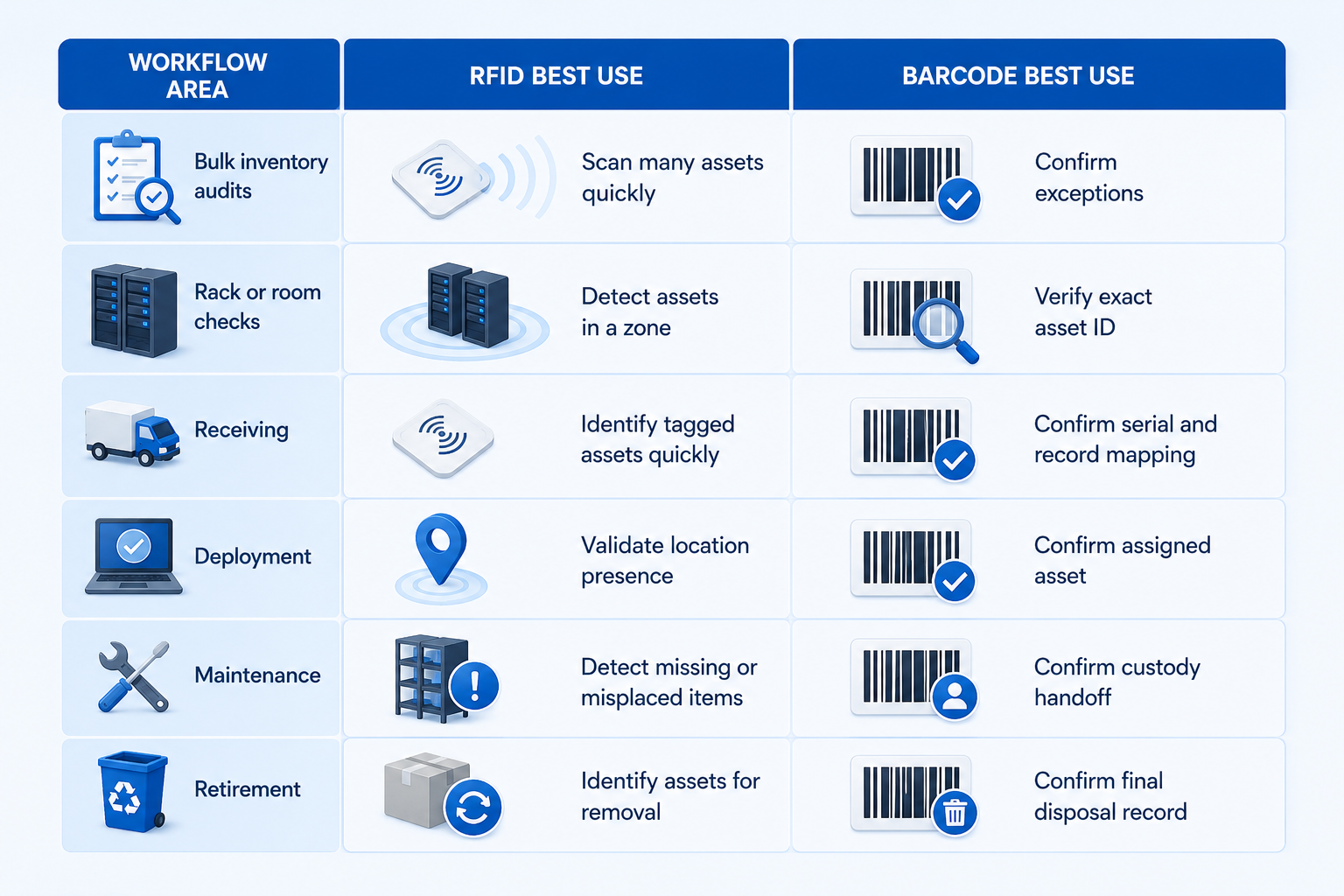
The goal is to reduce blind spots. RFID reduces the effort required to find and audit assets. Barcodes reduce the risk of updating the wrong record.
Best practices for enterprise IT and data center operators
To improve data accuracy in asset management, teams should focus on both hardware design and workflow governance.
Here are practical best practices:
- Use RFID for bulk visibility and barcode scanning for final confirmation.
- Test tags, labels, readers, and scanners in real operating conditions.
- Standardize asset IDs, serial numbers, locations, and naming conventions.
- Create scan points for every major asset lifecycle stage.
- Validate scanner configuration after firmware updates or device resets.
- Track every scan event with timestamp, user, device, and location.
- Create exception workflows for missing, duplicate, damaged, or mismatched assets.
- Review inventory accuracy regularly instead of waiting for annual audits.
- Avoid relying on spreadsheets as the source of truth for active assets.
- Use Asset Vue to connect RFID, barcode, mobile scanning, and inventory management workflows into one reliable asset tracking system.
Final thoughts
Hardware integration failures are not just technical issues. They are process issues that affect the reliability of the entire asset tracking system.
For enterprise IT and data center operators, accurate asset data supports better planning, faster troubleshooting, cleaner audits, and stronger operational control. But that accuracy depends on more than software. It depends on the quality of the hardware layer, the scan workflow, the data sync process, and the exception handling model.
The best approach is hybrid.
Use RFID where speed and scale matter. Use barcodes where precision and confirmation matter. Connect both to an inventory management platform that updates records, flags exceptions, and gives teams a reliable source of truth.
Asset Vue helps organizations build that foundation through RFID, barcode, mobile scanning, and inventory management workflows designed for complex environments.
That is the foundation of effective hardware-enabled asset management.
CTA
Ready to improve inventory data accuracy across your IT assets, racks, and facilities?
Explore Asset Vue’s RFID inventory management software or schedule a demo to see how hybrid RFID and barcode workflows can support more accurate, reliable asset tracking.