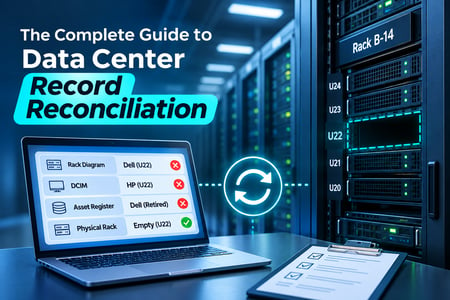
The rack diagram shows a Dell server in U22. The DCIM lists an HP in that slot. The asset register says the Dell was retired eight months ago. You walk to the cage, and U22 is empty.
Four records, four answers, and a technician standing in front of an empty rack unit deciding which one to trust. This is the problem data center record reconciliation exists to solve: not a single bad entry, but four systems that each believe they are right and quietly disagree.
Every enterprise data center runs on records that stand in for the hardware. Diagrams describe the rack. The DCIM tracks power and space. The asset system and CMDB track configuration and ownership. When those records agree with the rack and with each other, the data center is legible. When they drift apart, every capacity decision, every audit, and every 2 a.m. incident response starts with a guess. This guide explains why the records separate across a campus and how to pull them back together with physical asset tracking that keeps them honest.
Key facts
- Human error contributes to 66% to 80% of data center outages, and the most common cause is staff not following procedures, frequently because their information does not match the room (Uptime Institute, based on 25 years of outage data).
- 54% of operators said their most recent significant outage cost more than $100,000, and 20% said it cost more than $1 million (Uptime Institute, 2024 Annual Outage Analysis).
- Roughly 30% of physical servers are comatose, drawing power while doing no useful work; the Uptime Institute puts the range at 20% to 30% (Anthesis Group; Jonathan Koomey, Stanford).
- The CIS Controls rank Inventory and Control of Enterprise Assets as Control 1 and call for reviewing the asset inventory at least twice a year.
- A data center holds at least four records for the same hardware (diagram, DCIM, asset system or CMDB, and the rack), and only the rack is always current.
- Reconciliation confirms four facts per asset: existence, location, status, and custody.
- A cross-system record-count variance above 2% is a reliable early signal of a sync or reconciliation problem.
What data center record reconciliation is
Data center record reconciliation is the process of confirming that your documentation, your management systems, and the physical hardware all describe the same reality. It answers four questions for every asset: does it exist, where is it, what state is it in, and who owns it. Reconciliation is complete when the diagram, the DCIM, the asset record, and the rack give the same answer.
Most teams hold four records for the same hardware, and each one is authoritative for something different:
|
Record
|
What it is supposed to tell you
|
Why it drifts
|
|
Diagrams and documentation
|
Rack elevations, floor plans, and network maps showing where equipment sits
|
Frozen the moment they are saved; rarely updated after a move or swap
|
|
DCIM
|
Power draw, cooling, rack space, and U-position
|
Updated by facilities on its own schedule; misses changes logged elsewhere
|
|
Asset system / CMDB
|
Serial number, configuration, lifecycle status, custodian, and cost
|
Updated by IT and discovery tools that each key on different identifiers
|
|
The rack itself
|
What is physically installed right now
|
The only source that is always current, and the one nobody queries without walking the floor
|
The rack is the only record that cannot be wrong, because it is the thing itself. Reconciliation is the discipline of tying the other three back to it on a schedule, so the data in your systems reflects what a technician would find in the cage.
Why the records drift apart
Records separate from reality for a handful of reasons, and in a large environment all of them run at once. Each is a version of the same failure: a physical change happened, and at least one system never heard about it. The AssetVue breakdown of what breaks IT asset inventory accuracy catalogs the specific errors. The sections below explain the mechanisms that produce them in a data center.
Diagrams and documentation freeze the moment they are saved
A rack elevation is accurate on the day it is drawn. Then a server moves two U lower to clear a cable manager, a spare goes into an open slot during an incident, a failed unit gets pulled and never replaced on the diagram. The Visio file still shows the original layout. Documentation is a snapshot, and a data center is a film. The gap between the two widens every week nobody updates the drawing, which in most teams is every week.
Every system owns a different slice of the truth
The DCIM, the CMDB, the asset register, and the finance fixed-asset list each update on their own schedule, from their own sources, keyed on their own identifiers. The DCIM knows a chassis draws 840 watts in rack B-14. The CMDB knows it runs three applications. Neither reliably knows the other's view, and the sync jobs that try to bridge them drop detail, duplicate records, and mismap status values. When two systems disagree, the authoritative version of a field often depends on nothing more than which system wrote it last.
Campus scale multiplies the handoffs
A single room is hard enough. An enterprise with several data halls, edge closets, and colocation cages across a campus or multiple sites hands equipment between teams that each keep their own records. A server decommissioned in one hall and redeployed in another passes through at least three systems and two owners. Every handoff is a chance for one record to update and the others to lag. Distance and org-chart boundaries turn small lapses into standing gaps.
Physical events never reach the record
The root cause underneath all of the above is simple. Hardware changes state constantly, and the record only updates when someone remembers to tell it. A drive pulled for security before transport, a NIC swapped during a repair, a chassis shifted to balance power: each is a physical event that happens with hands, not keystrokes. If the keystroke never follows, the record is now wrong, and nothing in the system flags it as stale.
What out-of-sync records actually cost
Reconciliation sounds like housekeeping until you price the failures that bad records cause.
Wrong records put the wrong hands on the hardware
When a technician acts on a stale record, the action goes wrong. They power down the server the diagram labeled as spare, and take a production service offline. They patch the host the CMDB listed as active, and miss the one it never recorded. The Uptime Institute reports that human error plays a direct or indirect role in 66% to 80% of data center outages, and that the most common human-error outages come from staff not following procedures, often because the information they are working from does not match the room. Acting on a reconciled record is the difference between a safe change and an incident. The same Uptime analysis found that 54% of operators put their most recent significant outage above $100,000 and 20% put it above $1 million, so the cost of acting on a bad record is rarely small. The connection between accurate records and uptime runs straight into data center downtime prevention.
You pay for hardware you cannot see
Records that overstate your footprint cost money every month. Research by Stanford's Jonathan Koomey and the Anthesis Group found that roughly 30% of physical servers are comatose, drawing power and rack space while doing no useful work, and the Uptime Institute has put the range at 20% to 30%. You cannot safely retire a device your records cannot confirm is dead, so comatose hardware sits powered and under maintenance contract because no one trusts the inventory enough to pull it. Ghost assets, the inverse, keep inflating insurance and depreciation for equipment that left the building long ago.
Audits and security start from the inventory
The Center for Internet Security lists Inventory and Control of Enterprise Assets as the first of its 18 CIS Controls, and asks teams to review that inventory at least twice a year, because a device you do not know about is one you cannot patch, monitor, or wipe. An out-of-sync inventory is a security gap and an audit liability at the same time. Every discrepancy a federal or regulatory audit turns up becomes a manual investigation, and reconciliation is what keeps that list short.
How to reconcile data center records
Reconciliation is a repeatable workflow, not a one-time cleanup. These seven steps take a set of disagreeing records and bring them into alignment, then keep them there.
Step 1: Name one system of record and set field ownership
Decide which system is authoritative for each field before you touch the data. The tracking platform should own physical location. The CMDB should own configuration and service relationships. The DCIM should own power and space. Finance should own cost and depreciation. Write it down, and make every sync one-directional for each field, so only the owning system can write it. A single unified IT asset management system gives you one place to hold the authoritative asset record and one set of rules about what the other systems may overwrite. Without named ownership, reconciliation is temporary, because the next sync undoes it.
Step 2: Baseline with a physical sweep
Reconcile against the rack, not against another system. Run a full physical sweep of each hall and verify exceptions by hand. RFID makes this practical at scale: a reader captures hundreds of tagged assets in minutes instead of the hours a clipboard count takes. If you are deciding how to tag, how RFID asset tracking works explains where it fits and where barcode is the better call. The sweep produces the one number everything else reconciles against: what is actually installed, right now.
Step 3: Make the physical tag the primary identifier
Duplicate records come from systems keying on different identifiers, one on serial number, another on asset tag, a third on a CMDB configuration item ID. Put a durable RFID or barcode tag on the chassis itself, not on a bezel or rail that can separate from the device, and make that tag ID the key every system references. When one identifier bridges all four records, the dual-identity entries that split an asset's history stop appearing.
Step 4: Run a three-way match
For each asset, compare three sources: the physical scan, the DCIM or diagram, and the asset record. Where they agree, the asset is reconciled. Where they differ, the scan wins and the other records get corrected, because the scan describes the rack and the rack cannot be wrong. Resolve a server the diagram places in U22 but the scan finds in U24 by fixing the diagram, never by trusting the plan over the floor.
Step 5: Capture changes at the rack, continuously
A baseline is accurate the day you finish it and starts drifting the next. The fix is to capture physical change where it happens instead of reconstructing it later. AssetVue's approach to data center asset tracking uses Real-Time Racks and Smart Cabinets to report installed equipment and open U-space on their own, combined with passive RFID and barcode, and integrates with DCIM, CMDB, and ticketing so a move updates every system at once. When the rack reports its own contents, reconciliation stops being an event and becomes a background state.
Step 6: Work an exception queue on a cadence
Every mismatch the match surfaces goes into a queue with a named owner and a deadline. A record that misses an expected scan, a serial that appears twice, a status that disagrees across systems: each becomes a task somebody closes, not a silent gap that compounds. Set a staleness threshold, say 90 days, and route any asset not confirmed by a scan within that window to the queue for review. A missed read should become work, not a quiet error.
Step 7: Measure the match rate
You cannot manage reconciliation you do not measure. Each month, pull a random sample of records and verify existence, location, status, and custodian against the rack, scoring each field on its own since location drifts faster than existence. Track the match rate as a trend. Compare total active records across the CMDB, the DCIM, and a physical count, and treat any variance above 2% as a sync problem to investigate. A match rate that holds at 96% every month is healthier than one that hits 99% after an audit and slides to 90% by the next.
Keeping records reconciled after the first cleanup
The first reconciliation is the expensive one. Keeping records aligned afterward is cheaper, but only if the capture points stay in place. Teams that reconcile once and return to annual manual audits rebuild the same drift they just spent weeks clearing, because the process that caused the gap is still running.
Continuous capture changes the economics. Real-time asset management tools record location and custody as changes happen, which turns the next audit into a confirmation rather than a rebuild. When the readers, tags, and rack sensors are doing the recording, accuracy stops depending on anyone remembering to update a field, and the match rate holds steady between reviews instead of sawing up and down around them.
Diagrams, DCIM, and rack contents drift apart the day after your last audit. AssetVue reconciles them with passive RFID, barcode, and rack-level tracking that integrates with your DCIM and CMDB, so your records match your hardware across every hall. Schedule a call to map reconciliation for your data center.


 Contact Us


 FAQ